for two people, two time zones
Know when they’re awake.
One sky over both of you. Their local time, their light, and whether they are awake right now, on your Home Screen. You never do the arithmetic again.
right now
You have done this sum a hundred times.
Nine and a half hours. Forward or back. Whether that means they are asleep, or about to be, or already three hours into their day. Same Sky answers it before you have finished asking.
Live, between the two cities this app was built for.
the sky
Their light above.
Yours below.
Open the app and you are looking at both of your skies at once, meeting at a horizon in the middle. Their half is the light where they are. Yours is the light where you are.
The colours are not decoration. They come from the real position of the sun at your coordinates and at theirs, worked out on your phone from published astronomy, with no network involved. Their half is genuinely dawn while yours is genuinely dusk.
The moon between the two halves is tonight’s moon, at its real phase. It is the same one you are both under, which is the whole idea.
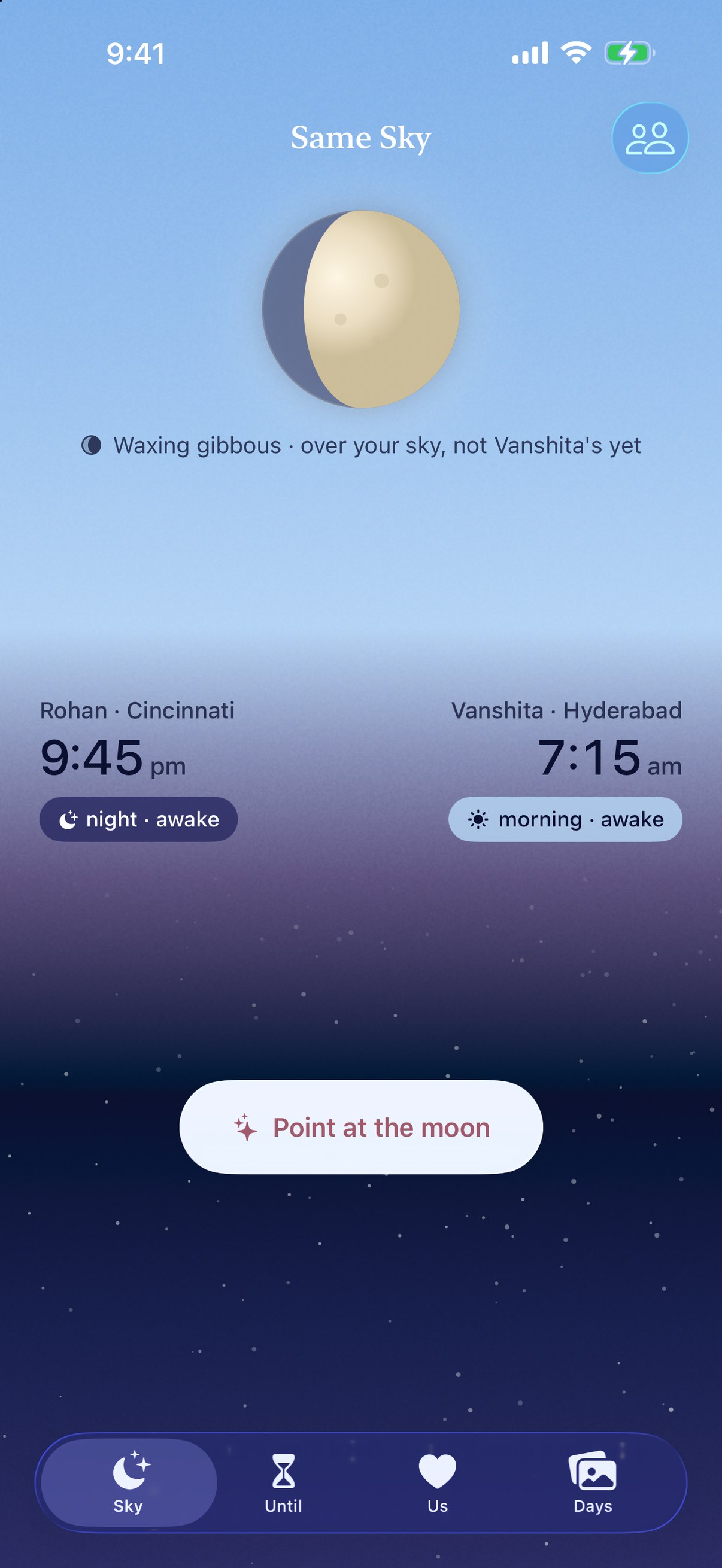
home screen and lock screen
Their day, without opening anything.
Both clocks, tonight’s moon and the hours you overlap, on the Home Screen. On the Lock Screen, their time sits beside the date and a ring shows how far through their day they are. In StandBy too, and all of it works offline, because the astronomy is computed on the phone rather than fetched.
 Same Sky
days
One photo a day, each.
A journal the two of you keep together. One picture a day from each of you, on the days you feel like it. Nothing is mandatory, nothing nags you, and there is no streak to break.
Your evening is often their morning, so a day in it is the same moment seen twice. Go back through the months and the day you are thinking of is right there, with whatever either of you said about it.
Days needs both of you, because a one sided journal is not a journal. Until the other phone can take them, the app says so plainly and keeps your photos safe on yours.
and
Everything else it does.
The call window
The hours you are both awake, and exactly how much of today's is left. No counting on your fingers, no waking anybody at three in the morning by accident.
Countdowns
The next time you are together, to the second, and how long it has been since the last time. Put it on the Lock Screen and it is the first thing you see.
Quiet hours
Nothing this app sends arrives while the person receiving it is asleep. Anything that would land in their night waits for their morning, every time.
Point at the moon
One tap to say you are thinking of them. It reaches their phone, and if they are asleep it waits until they are not.
Everyone else's sky
Not only the person you are paired with. Keep your parents' and your friends' local times too, on the same screen and in a widget.
Not only for couples
Built first for partners apart, and just as much for military families, for parents whose children moved abroad, and for anyone who keeps doing the arithmetic.
a look inside
There is no server.
That is not a slogan, it is the architecture. There is nowhere for us to keep your data, because there is no us holding anything.
Private by default
Nothing is opt out. The private path is the only path, and there is no setting you have to find to make it true.
No analytics, no ad SDKs
No analytics package, no attribution SDK and no advertising network anywhere in the app. Nothing about how you use it is measured or reported.
Your state lives on device
The two people you set up, your countdowns, your journal and your streak are stored on your phone. The sun and the moon are calculated there too, from the cities you picked.
Syncs through your own iCloud
Pairing creates a shared record zone inside your personal iCloud account and gives one person access to it. We cannot read it, and that is how it is built rather than a promise.
No account at all
Nothing to sign up for and nothing to sign in to. No passwords, no email list, no marketing.
Nothing is sold or shared
Not to advertisers, not to data brokers, not to anyone, for any purpose. There is no mechanism in the app by which it could be.
The full detail is in the privacy policy, including location, photos, weather, notifications and how to delete everything.
support
A person reads every message.
Same Sky is small and built by one person, so help comes from someone who knows the whole app rather than from a queue.
Getting help
Write to hello@sameskyapp.com with your iOS version and what you were doing when it went wrong. There is no ticket system and no bot in the way.
Setting up together
Settings, under the two of you, makes an invite link you can send however you like, plus a six character code you can read down the phone. Codes last 24 hours and stop working once used.
Your data, on request
Everything the app holds is on your phone and in your own iCloud, so there is nothing for us to export. Settings has a Delete everything option that removes all of it, including the shared copy.
Feature requests
Genuinely welcome at the same address. The app is small on purpose, so the answer is sometimes no, but it will be an honest answer rather than silence.
More answers on the support page, or write to hello@sameskyapp.com.
and in the morning